
How to get the Toll Box to light up green
It is important that you connect the box to power before using it.
The first time the box starts up, it will light up red, and it will display 'Waiting for vehicle data'. This will disappear once the box is configured with vehicle details. Vehicle details must be added in our self-service.
The configuration can take between 10 minutes and 2 hours. After that, you need to approve the number plate, and then the box will light up green.
If the box requires a new update, this update will be completed the first time the box is turned on and has a mobile signal.
If the box does not turn on automatically when the driver starts driving, you must manually press the green button to activate the box.
Ensure that the road toll box or app lights up green before you drive
If the Toll box or Toll app lights up red during a trip, you should pull over at the next safe place and try to resolve the issue, as you risk getting a fine otherwise.
Make sure that the Toll box is always correctly mounted to the power supply. If the Toll box gives a warning that the battery level is low, it is important that you respond and restore the power supply.
Outages in the GPS signal, which result in the Toll box switching from green to red light, do not incur fines, as the toll system automatically compensates for short-term outages. If the GPS signal is lost for more than an hour and the Toll box lights up red, you must respond by pulling over at the next safe place.
Try to resolve the issue or purchase a Toll ticket before continuing the trip.
Reasons for a red light can be:
- Missing vehicle data (can be added in Brobizz's self-service).
- Vehicle data needs approval on the device. Press the green checkmark until the device lights up green.
- Device or app is blocked.
- Other error code: Read more on What do we do if our device is blocked or broken? or contact Brobizz Customer Service.

Get Started with your Toll Box
To give you the best start, we have compiled everything worth knowing before you start using your Toll Box into one manual.
How to Install the Toll Box
The Toll Box must be connected to a permanent power source or via the cigarette lighter.
It is important that you install the Toll Box correctly in the truck so that it functions properly when you drive.

How to connect the Toll Box to a permanent power supply
When the Toll Box is connected to a permanent power supply in the vehicle, it is important that the wires are connected to the correct terminals.
We recommend a permanent power connection. There are two installation options:
- Constant power supply to the box
With this installation, both positive wires (red and black) are connected to a constant power source, while the ground wire (white) is connected to the chassis/negative terminal.
This ensures that the box is always powered and will not send power supply notifications unless there is an actual issue.
Important: Always remove the box from its holder if the vehicle will be stationary and out of service for an extended period. This helps prevent the box from draining the vehicle's battery. - Power supply when the vehicle ignition is on
With this installation, the black positive wire is connected to an ignition-switched power source, while the red positive wire is connected to a constant power source.
The ground wire (white) is connected to the chassis/negative terminal.
The box will then only receive power when the vehicle ignition is switched on.
This installation provides stable operation but may trigger unnecessary notifications about a missing power supply, for example when the vehicle is switched off.
The wires for the power supply
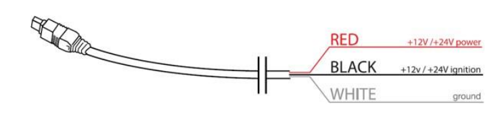
Ledningerne til strømforsyningen
If the wires are connected to the wrong connection points, it can cause issues with the power supply to the box and the signals the box receives.
The box will not receive the correct signal that the vehicle is starting up or shutting down if the red and black wires are connected incorrectly.
New update for the Toll Box
We are updating the software in your Toll Boxes to ensure you have the latest update.
box in use
- If the box is already in use
If the Toll Box is turned on and has a mobile signal, it will automatically update. The box can still be used as payment on the Storebælt Bridge, the Øresund Bridge, and for driving in Norway while the update is in progress. - If the box is not in use
If the Toll Box is not yet in use, it will update the first time you turn it on, and it has mobile signal. The box will automatically restart upon startup to receive the latest update. - If you have not received your boxes yet
If you have not received your Toll Boxes yet, you may experience that the box needs to be updated and restarted the first time you use it.
Most common error codes and solutions
Some of our customers experience error codes when starting the box, so we have created an overview for you with the most common error codes and solutions.
|
Error codes |
Solution |
|---|---|
|
4006, 4008 and 17002 |
Ensure that the box is correctly connected to the power supply and has a mobile signal. Then wait until the box restarts. Within 24 hours, the box will update, restart, and light up green. The box can still be used on the Øresund Bridge, the Storebælt Bridge, and in Norway, even if it shows this error code and lights up red. |
|
5002 and 5004 |
Connect the power supply and wait for the box to restart. |
|
50010 |
The box is blocked. If the box lights up red but is not blocked with error code 50010, it can still be used on the Øresund Bridge, the Storebælt Bridge, and in Norway. |
This is how you get started
Self-service
Log in to the self-service to view your usage, order more boxes, or update your payment card.
Log inHelp Universe
In our help universe, you can find guides and get answers to most of your questions.
Visit our help universeAnswer to frequently asked questions
What does it mean when the box lights up in red?
What does it mean when the box lights up in red?
If the box lights up in red there is an error you need to act on.
See the different causes of errors
Read about what to do, if there is an error on the box.
How do we deactivate our Toll box?
How do we deactivate our Toll box?
You deactivate your Toll Box in our self-service. Read more.
How do we cancel our Toll box?
How do we cancel our Toll box?
You cancel it in our self-service. Read more.